Self-hosted media dashboard

Your library, in lights.

Look up any film, show, actor or studio and see instantly whether it’s already in your Plex, Jellyfin or Emby library, then send what’s missing to Sonarr or Radarr, or let the household request it.

Open source under MIT One Docker container Apps for Mac, Windows and iPhone In beta, v0.71.0

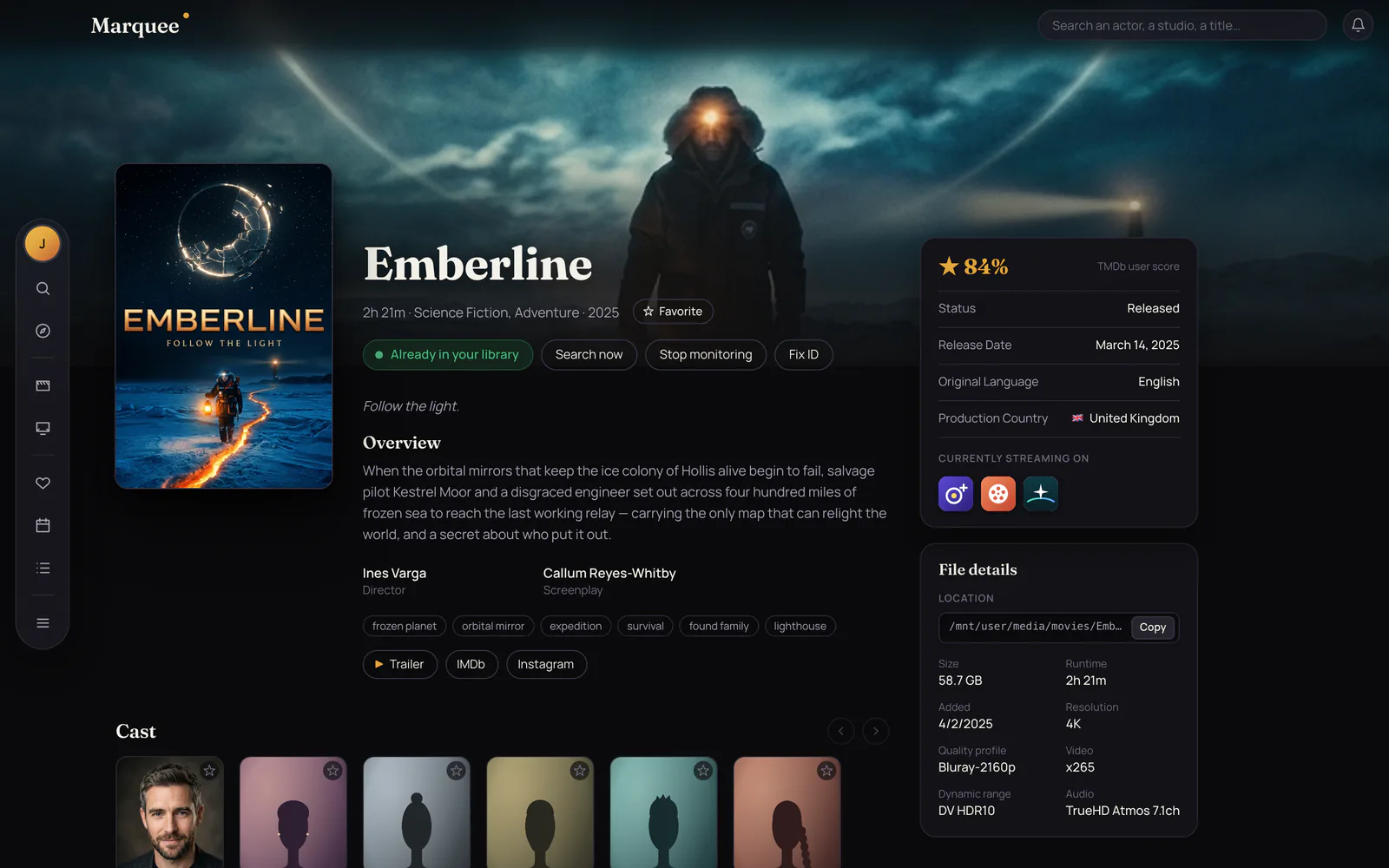
Marquee’s page for Emberline, a made-up film, with the navigation rail floating at the left edge and the backdrop running under it. A green “Already in your library” badge sits under the title next to Search now, Stop monitoring and Fix ID, and a File details card lists the file’s location, size, 4K resolution, video codec, Dolby Vision HDR10 and TrueHD Atmos audio.

Works with the Plex, Jellyfin, Emby, Sonarr and Radarr you already run.

At a glance

Know instantly what’s already yours.

Every poster carries its status, in the same colors Sonarr and Radarr use, checked against Plex, Jellyfin, Emby, Sonarr and Radarr: on Discover, in search results, across an actor’s filmography and a studio’s whole catalog. No more opening three apps to find out you already have it.

Owned
The file is in your library, ready to watch. Shows count their episodes, like 96/96.
Downloading · 63%
Downloading or queued right now, with how far along it is.
Ready to move
Finished downloading but not imported. Move it into your library and it turns Owned on its own.
Missing
Monitored, but Sonarr or Radarr hasn’t found a copy yet. It keeps looking.
Not monitored
In Sonarr or Radarr, but it won’t download on its own.
Coming soon
Added, but not released yet, so it never looks like something’s missing.
No badge
Not in your library. Add it in one click, or request it.

Open any title for the rest: full-width artwork and the title’s own logo, IMDb, Rotten Tomatoes and Metacritic ratings, where it’s streaming, every season with each episode’s status, cast and crew, Play on Plex, Jellyfin or Emby, and the file itself, down to its location, size, resolution, codecs, HDR and audio. While something downloads, Marquee checks every minute, so the status keeps up.

How it connects

It sits in front of the stack you already run.

Marquee doesn’t replace Plex, Jellyfin, Emby, Sonarr or Radarr. Connect whichever you use from Settings and it keeps them in step: your libraries sync on a schedule you set, Sonarr and Radarr webhooks report each grab and finished download as it happens, and while anything is downloading Marquee checks every minute.

Reads from

Metadata
TMDb TheTVDB
Libraries
Plex Jellyfin Emby
Downloads
Sonarr Radarr 4K servers
Lists
Trakt Plex Watchlist
Ratings
IMDb Rotten Tomatoes

Marquee

on your server, port 3000

Serves

The admin
adds titles, approves requests
The household
browses, favorites, requests
Alerts
your devices, email, Discord, Slack, Telegram, ntfy and more
Anywhere
browser, phone, Mac, Windows and iPhone apps, API

Browsing runs on TMDb, and its API key is free. Plex, Jellyfin and Emby can run side by side, or just one, and you can add several Sonarr and Radarr servers, including separate 4K ones. TheTVDB fills in posters TMDb doesn’t have yet, a free OMDb key adds the ratings, and only the admin can connect or change any of it.

For the household

Requests, without the group chat.

Give everyone at home an account of their own, or let them sign in with Plex, Jellyfin or your single sign-on. They get the whole app (Discover, Search, Calendar, Favorites), but instead of adding titles to Sonarr or Radarr they hit Request, down to the seasons they want. You approve from one queue, and they hear back either way.

  1. 1

    Sam asks

    Where you’d see Add to Radarr, members see Request.

    Sam’s Requests tab Pending review
  2. 2

    You approve

    Everything waiting sits on one Requests page. Approve all clears the queue; a decline, or a “Can’t get it” later on, asks you why.

    Sam’s Requests tab ApprovedDownloading
  3. 3

    Sam hears back

    Once the whole thing is in (the movie, or every episode of the seasons Sam asked for), a notification lands on Sam’s phone, once. A decline comes with your reason.

    Sam’s Requests tab In your library

Notifications, from your own server.

After you sign in, Marquee asks whether this device should get notifications: a request approved or declined, a title ready to watch. Your server sends them itself, so there’s no third-party service to sign up for. Each person also picks their own extra channels and which events they want.

Sealed
On the website they’re standard Web Push, encrypted end to end so only your device can read them. The browser’s own push relay carries the sealed message and nothing more.
On your phone
Open Marquee over https, for example through a tunnel or reverse proxy. On iPhone and iPad, add it to the Home Screen first.
No relay at all
The Mac, Windows and iPhone apps get them straight from your server, over a live connection, while they’re open.
Your devices
Settings › Account › Notifications turns them on or off, lists your devices and sends a test.
Trusted members and limits
Auto-approve a member’s movies, shows or both, let trusted members review requests, and give anyone a request limit, like five movies a week.
Bring a watchlist
Add something to your Plex Watchlist, or a public Trakt list, and anything you don’t already have joins the queue by itself.
Tell the whole house
Grabs, finished downloads, approvals and declines can post to Discord, Slack, Telegram, ntfy, Gotify, Pushover, Pushbullet, email or any webhook.

And a lot more

Everything Seerr does, and your library too.

Marquee started as a way to see what you already own. It’s grown into a full request app for the household, with the admin tools to run it, while keeping the library and file details front and center.

The Library page
Everything in Plex, Jellyfin, Emby, Sonarr and Radarr in one place, with filters for 4K, HDR, codec and more, franchises you only partly own, duplicates, and a forecast of when your disks fill up.
Download watch
Title pages show how far a download has got. A finished download that wasn’t imported shows as Ready to move, and turns Owned once you move it into place.
Your own Discover
Reorder, hide or add rows: a keyword like anime, a genre, a studio like A24, a network, a TMDb or Trakt list, or what was just added to your server.
Search that sorts itself
Results come in Movies, TV Shows, People and Studios & Networks. Type “dune 1984” for that version, or a name to put people first.
People and studios
Every actor, director, studio and network has a page with their whole catalog, each poster wearing its status, over artwork from what they’re best known for.
Five languages
English, Spanish, French, German and Portuguese, down to titles, overviews and posters from TMDb and the notifications each person gets.
Admin tools
Override rules that send requests to the right server, profile and folder; job schedules; a log viewer; an automatic blocklist by age rating; and Remove from Radarr or Sonarr.
Comments and problem reports
Anyone can report a problem with a title, and talk it through with the admin in a thread on the request or the report.
Coming from Seerr?
Import your users, requests, problem reports and blocklist from Seerr, Overseerr or Jellyseerr. You see a preview first, and nobody gets notified.
See everything Marquee can do, or the guide to moving from Seerr.

Marquee for Mac

Your server, in a native window.

A real SwiftUI app with no library of its own. It finds the Marquee server on your home network by itself, stays signed in across updates, and shows exactly what the website shows, Settings included. If your server restarts, it waits and reconnects on its own.

  • Notifications straight from your server. System banners and a Dock badge, over a live connection with no relay in between. Click one and the title opens, even if the app was closed.
  • The same rail, and your photo. Every section one click from the left edge, as on the website, with your profile photo on top.
  • Right-click everything. Open, Add or Request, Favorite, Copy Link and Open in Browser on any poster or person.

Open it and drag Marquee onto the Applications folder beside it. It isn’t notarized yet, so the first launch needs System Settings › Privacy & Security › Open Anyway. After that, it updates itself.

Marquee for Mac showing the page for Emberline, a made-up film: the navigation rail floating at the left edge, the poster, the library badge and actions under the title, and cards with the TMDb score, release details and file details.
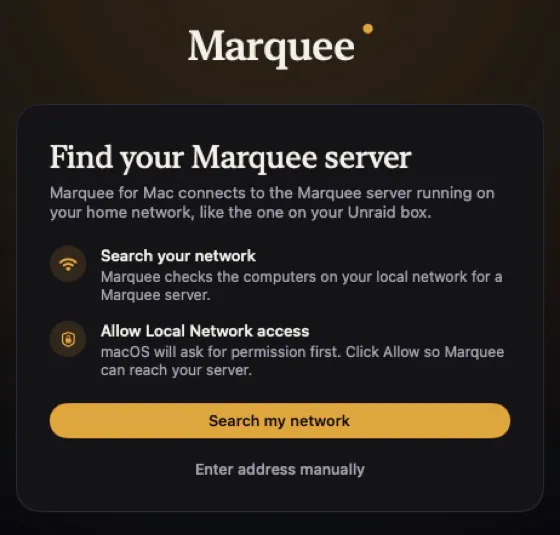
The Mac app’s first-run screen, Find your Marquee server, with a Search my network button and an Enter address manually link.
  • ⌘1–6 sections
  • ⌘F search
  • ⌃⌘S menu
  • ⇧⌘E surprise me

Needs macOS 15 Sequoia or later. Keep the app and the server on the same version for everything to line up; the app tells you when either has an update. Free and open source, like the server.

Marquee for Windows Preview

And now, on Windows.

A native WinUI 3 app, built alongside the Mac one: the same rail, the same pages and the same Settings, talking to the same server. Type in your server’s address, sign in, and the household’s library is there.

  • Everything the house uses. Discover, Movies and Series, the Library, search, title pages with Add or Request and the season picker, favorites, the calendar, and requests.
  • Notifications with no relay. While Marquee is open, your server’s notifications show up as Windows notifications, straight over a live connection.
  • Run the server from it. Members, media servers, Sonarr and Radarr, notifications, Discover rows, the blocklist and jobs, all in Settings.

Not there yet: marquee:// links, and finding your server on the network by itself.

Run it: it installs Marquee for your account (no admin prompt), adds it to the Start menu and opens it. It isn’t code-signed yet, so if SmartScreen says “Windows protected your PC”, choose More info › Run anyway. A newer installer updates it in place.

Needs Windows 10 1809 or later, or Windows 11.

Marquee for iPhone and iPad Preview

In your pocket, from the same code.

Built from the Mac app’s SwiftUI code, so it looks and behaves the same, sized for the phone. Sign in with your server, Plex, Jellyfin or single sign-on, and the household’s library is there.

  • Tabs along the bottom. Discover, Search, Requests, Calendar and More, the same five as the website on a phone. On iPad, a sidebar like the Mac’s.
  • Approve from the couch. Requests are full-width cards with Approve and Decline, and the title pages have Request and the season picker.
  • Settings built in. The same tabs as the Mac, from members to notifications, without opening the website.

It isn’t on the App Store: you build it onto your own iPhone or iPad with Xcode. Notifications arrive while the app is open; for alerts when it’s closed, add the website to your Home Screen, or use ntfy, Pushover or Telegram. Needs iOS 18.

Runs on your server

One container. Your hardware.

Marquee is a single Docker image with Postgres built in, so there’s nothing else to install or wire up. Run it on Unraid, a Synology or a spare box, next to the Plex, Jellyfin, Emby, Sonarr and Radarr it talks to. Database migrations apply on every start.

Docker Compose

git clone https://github.com/TimmyAmant/marquee.git
cd marquee
cp .env.local.example .env
# now set POSTGRES_PASSWORD, AUTH_SECRET and
# MASTER_ENCRYPTION_KEY in .env
docker compose up -d

Then open http://<your-server-ip>:3000. The first visit creates your admin account; connect everything else from Settings.

Generate the two secrets with openssl rand -base64 32, and back up MASTER_ENCRYPTION_KEY: it’s what decrypts your saved Plex, Jellyfin, Sonarr and Radarr credentials. You’ll also want a free TMDb API key, in .env or added later in the app.

Port
3000
Image
timmyamant/marquee
Arch
amd64
License
MIT

On Unraid

Marquee is in Community Applications: open the Apps tab, search “marquee”, and fill in the passwords and keys the template asks for. Where the database and the logs live is already filled in.

Away from home

Marquee speaks plain HTTP on your network. The README walks through a Cloudflare Tunnel on your own domain, which also brings the https that notifications on phones need, and putting Authelia or Cloudflare Access in front, with what to exempt so the apps and webhooks keep working.

Your library stays on your server.

No cloud
No account with us, no hosted service and no analytics.
Your data
What you own, what the house asked for, who they are and their profile photos live in a Postgres database inside the container, which doesn’t listen outside it.
Your keys
Saved Plex, Jellyfin, Emby, Sonarr and Radarr credentials are encrypted at rest with AES-256-GCM. Passwords are hashed with argon2 and sign-ins are rate-limited.
Calls out
Only to what you connect: TMDb for metadata and artwork, plus TheTVDB, OMDb, Trakt, plex.tv, your sign-on provider and your notification channels if you use them. Notifications in a browser pass through that browser’s push relay, sealed so it can’t read them.

Marquee is in beta and changes often. Back up your database before updating.

Recent release

0.71.0 Download watch

  • While anything is downloading, Marquee checks Sonarr and Radarr every minute, and title pages show how far along it is, like “Downloading · 63%”.
  • A new teal Ready to move status for a download that finished but wasn’t imported, with one notification for the admin.
  • Move the file into place and Marquee asks Sonarr or Radarr to look again: it turns Owned within a couple of minutes, and whoever asked for it is told it’s ready to watch.
  • Recently: “Can’t get it” for approved requests, native Settings on iPhone and iPad, and movie details in your own language.